

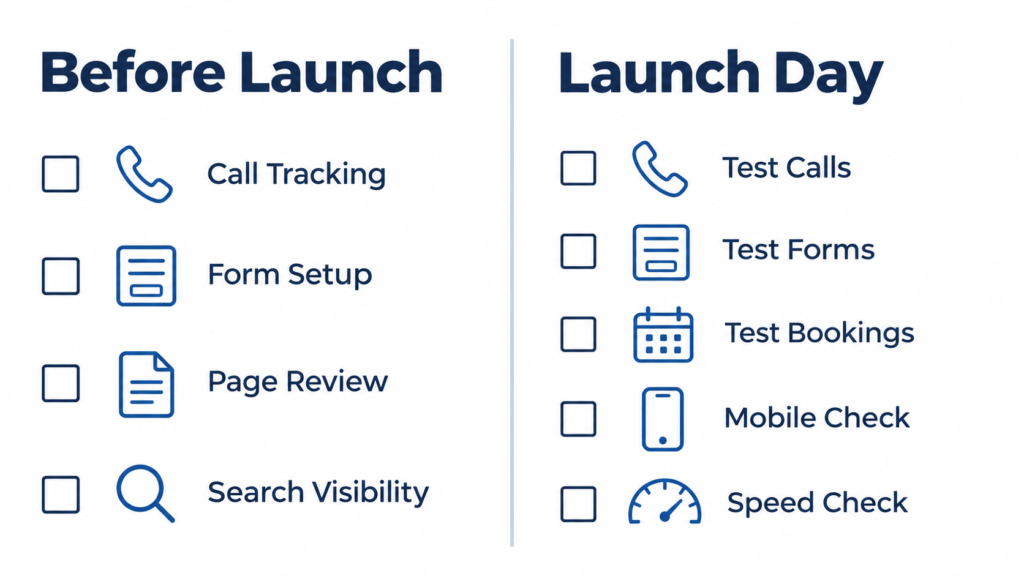
A website redesign checklist starts before anyone opens a design file. First, write down what your current website already does for you, like the calls it brings in, the pages Google shows, and the details customers look for. Then make sure every one of those still works on the day the new website goes live.
Picture the week after a new website launches. It looks sharp. Your team likes it. Then on Tuesday your office manager mentions the phone has been quiet. Nobody can say why, because nobody wrote down how many calls the old website brought in.
A redesign can break the things that brought you work without anyone noticing. The phone number might stop dialing when someone taps it. A service page Google used to show might now lead to an error page. A form might send inquiries to an inbox nobody checks. Each one is easy to fix once you spot it.
You can find long lists of website redesign best practices about fonts, colors, and layouts. This checklist covers the part that pays for the website. The calls and bookings it brings in.
Count the Calls Before You Change Anything

Start the website redesign process with one month of numbers from your current website. That baseline is how you will know later whether the new website helped or hurt.
Write down these four things.
- Calls that came from the website, if you use call tracking.
- Form inquiries and online bookings.
- The pages that get the most visits, from Google Search Console.
- The searches people use to find you, from the same report.
If you have no tracking at all, set it up now and give it a few weeks before launch. A redesign with no baseline leaves you guessing.
Every Old Link Needs a New Home
When a page moves to a new address, Google has to be told where it went. The fix is a 301 redirect, a permanent forward from the old address to the new one. Google’s own guide to moving a website says these permanent redirects keep the link credit the old page earned.
Before launch, list every page on the old website and match each one to its closest page on the new one. The old AC repair page forwards to the new AC repair page. The old Invisalign page forwards to the new Invisalign page.
Google’s guidance says to keep these redirects in place for at least 180 days. We leave them up for good, so old links on directories and bookmarks keep landing in the right place.
What Your Customers Look For First

A redesign is when small details fall off a page. Check that the new website keeps everything your customers came for.
For HVAC Companies
- A phone number that dials when tapped. In a breakdown, a homeowner searches, checks reviews, and calls whoever answers.
- Your Florida contractor license number. Florida Statute 489.119 requires it in every advertisement in any medium, and your website is one of them.
- Your service areas, financing, and maintenance plans, wherever they appeared before.
- After-hours details, if you take emergency calls.
For Dental Practices
- The insurance plans you accept. Patients check this before they call.
- Whether you are taking new patients, and how to book.
- The dentist of record’s name and after-hours contact, if a business entity advertises the practice. Florida Statute 466.019 requires both.
- Wording that stays within Florida’s dental advertising rules, which cover websites. They rule out praising the dentist and comparing your care with other dentists.
- A business associate agreement for any new form or chatbot that collects patient details. Under HIPAA, the company behind that tool is a business associate.
Your Website Redesign Checklist for Launch Day

Hand this list to whoever builds your new website, and ask them to sign off on each line. Run it on launch day and again a week later.
- Open every old address on your redirect list and confirm each one lands on the right new page.
- Tap the phone number on the website from your own phone and make sure it rings.
- Submit every form and confirm the right person receives it.
- Book a test appointment if you offer online booking.
- Open the website on a phone. Google indexes the mobile version first, so that version is the one that counts.
- Check the Core Web Vitals report in Search Console. The main content should appear within 2.5 seconds.
- Confirm Search Console is still verified and submit the new sitemap.
- Confirm call tracking and analytics are recording.
- Update the website link on your Google Business Profile if the page it points to has moved.
The First Month After Launch

Compare calls and inquiries against your baseline every week. Count them the same way you did before launch, so the comparison is fair.
If calls drop, go back through the website redesign checklist before you blame the design. A broken redirect or a form going to the wrong inbox is a quick fix.
After that, make one change at a time. When several things change together, you cannot tell which one helped.
When a Redesign Is the Wrong Fix
Some websites need a redesign. Some businesses need their phones answered. Before you collect website redesign tips, open last week’s missed call log. If calls are coming in and going to voicemail, a new website sends more calls into the same gap.
A good website redesign strategy fixes one problem you can name, like a website that breaks on phones or pages that skip the services you want to sell. If you cannot name the problem yet, start with your baseline. It shows where people arrive and where they stop.
If you are planning a redesign, we can review your current website and show you what to protect before anyone touches it. Talk to our web design team.